Searching Database Content with Fast Search for SharePoint 2010 – Part 2
FAST Search for SharePoint 2010 JDBC Database Connector
FAST Search has a JDBC Database Connector that can be used to crawl and search across data from a database. As explained in Part 1, this connector is a port from FAST ESP. You can also use the BCS with FAST Search to crawl database content, which will be detailed in Part 3.
This examples was produced on the 2010 Information Worker Demonstration and Evaluation Virtual Machine (RTM) downloaded from - http://www.microsoft.com/downloads/en/details.aspx?FamilyID=751fa0d1-356c-4002-9c60-d539896c66ce&displaylang=en
If you don’t have your own FAST environment setup, and you want to run through these examples, download the IW Demo VM as it contains a completely functioning FAST Search server.
The IW VM also has a series of SQL Databases that you can have a play with. To work through these examples I’ve selected the Contoso_Retail_DW database, this database contains a table called DimProduct with 2517 rows of product data. The Products fall into the following main categories:
- Audio
- TV and Video
- Computers
- Cameras and camcorders
- Cell phones
- Music, Movies and Audio Books
- Games and Toys
- Home Appliances
For search purposes I always like to create a denormalised SQL View or SQL Statement. The following SQL Statement only returns the columns of data I want to use for this demonstration, it’s typically worth creating a stored procedure or SQL View at this point.
SELECT
p.ProductKey,
p.ProductName,
p.ProductDescription,
p.BrandName,
p.ClassName,
p.ColorName,
p.UnitPrice,
psc.ProductSubcategoryName,
pc.ProductCategoryDescription
FROM Contoso_Retail_DW.dbo.DimProduct p
LEFT OUTER JOIN Contoso_Retail_DW.dbo.DimProductSubcategory psc
on p.ProductSubcategoryKey = psc.ProductSubcategoryKey
LEFT OUTER JOIN Contoso_Retail_DW.dbo.DimProductCategory pc
on psc.ProductCategoryKey = pc.ProductCategoryKey
The data is quite handy for demoing FAST Search capabilities, as we should be able to setup some nice Refiners for Brand, Class, Colour and Price.
So now we have our SQL Statement, the next step involves getting FAST to execute this SQL and then feed it into its search Index so we can search over it.
Create a New Content Collection
This step isn’t mandatory, you can choose to use the default sp content collection that is setup by default in FAST Search for SharePoint 2010. When crawling content outside of SharePoint using a different connector, I like to create a new Content Collection, as you can clear this Content Collection and still leave the default content collection intact. You may have millions of items already crawled in the sp content collection.
To create a new Content Collection use the New-FASTSearchContentCollectionPowershell cmdlet in the FAST Search Powershell console.
Note: FAST Search has its own Powershell console for executing FAST Search related cmdlets, make sure you use the Microsoft FAST Search Server 2010 for SharePoint shell for all FAST Search related configuration.
PS C:\FASTSearch\bin> New-FASTSearchContentCollection -name ContosoProducts -Description "A collection for Contoso Retail Product content from the Contoso_Retail_DW SQL Server 2008 database"
Name : ContosoProducts
Created : 2010-11-20T23:06:59
Cleared : 2010-11-20T23:06:59
LastInput :
DocumentCount : 0
Description : A collection for Contoso Retail Product content from the Contoso_Retail_DW SQL Server 2008 database
Pipeline : Office14 (webcluster)
Note that the maximum name length for a Content Collection is only 16.
The next step involves creating a JDBC Connector configuration file. Navigate to the \etc folder in your FAST install directory. This is C:\FAST\etc in the IW VM. The etc folder contains a series of configuration files for configuring FAST Search, there are a few example files that can be used for connectors, the one we are after is called jdbctemplate.xml. Make a copy of this file and rename it, eg. ContosoProduct_jdbctemplate.xml.
Now edit the file in your XML editor of choice. Some of the settings you want to change are:
The connector can connect to a variety of database servers, enter the Microsoft SQL Server specific driver in the JDBCDriver setting.
JDBCDriver com.microsoft.sqlserver.jdbc.SQLServerDriver
Enter the DB Server and Database in the JDBCUrl setting
JDBCURL jdbc:sqlserver://DEMO2010A:1433;database=Contoso_Retail_DW
Enter the SQL Select statement for the JDBCSQL setting.
JDBCSQL
p.ProductKey,
p.ProductName,
p.ProductDescription,
p.Manufacturer,
p.BrandName,
p.ClassName,
p.ColorName,
p.UnitCost,
p.UnitPrice,
psc.ProductSubcategoryName,
pc.ProductCategoryDescription
FROM Contoso_Retail_DW.dbo.DimProduct p
LEFT OUTER JOIN Contoso_Retail_DW.dbo.DimProductSubcategory psc
on p.ProductSubcategoryKey = psc.ProductSubcategoryKey
LEFT OUTER JOIN Contoso_Retail_DW.dbo.DimProductCategory pc
on psc.ProductCategoryKey = pc.ProductCategoryKey
]]>
Now specify the primary key column to use
JDBCPrimaryKeyField ProductKey
and the content collection we created earlier.
Collection ContosoProducts
For testing purposes you can also make the connector output FAST XML files containing the data of the content crawled by setting ExportToXML to true.
ExportToXML True
Now run the connector by executing the jdbcconnector.bat file as follows:
PS C:\FASTSearch\bin> jdbcconnector start -f ../etc/ContosoProduct_jdbctemplate.xml
Copyright (c) Microsoft Corporation. All rights reserved.
23:46:03,516 INFO [JDBCConnector] Starting the connector!
23:46:03,523 INFO [JDBCConnector] Validating config.......
23:46:03,742 WARN [JDBCConnector] Empty parameter Input/JDBCPassword in config
file
23:46:03,926 INFO [JDBCConnector] Testing connections to external systems
23:46:03,961 WARN [JDBCConnector] Empty parameter Input/JDBCPassword in config
file
23:46:03,994 INFO [JDBCConnector] Checking if connections to source and target
work....
23:46:04,617 INFO [JDBCAdapter] Opened JDBC Connection
23:46:04,621 INFO [JDBCConnector] Connection made to source system
23:46:04,632 INFO [CCTKDocumentFeeder] Publisher :Initializing: com.fastsearch.
esp.cctk.publishers.CCTKDocumentFeeder
23:46:04,750 INFO [CCTKDocumentFeeder] Using Content Distributor(s): demo2010a.
contoso.com:13390
23:46:04,764 INFO [FASTXMLOutputHandler] Creating output Directory: ..\var\jdbc
connector\ContosoProducts\fastxml
23:46:05,121 INFO [CCTKDocumentFeeder] Initiated CCTK Document Feeder:
23:46:05,122 INFO [CCTKDocumentFeeder] FASTSearchSubmit/ActuallyPublish:true
23:46:05,123 INFO [CCTKDocumentFeeder] XMLExport/ExportToXML:true
23:46:05,125 INFO [CCTKDocumentFeeder] FASTSearchSubmit/Collection:ContosoProdu
cts
23:46:05,128 INFO [CCTKDocumentFeeder] FASTSearchSubmit/MaxActiveDocuments(MB):
10
23:46:05,130 INFO [CCTKDocumentFeeder] FASTSearchSubmit/MaxBatchSize(KB):1000
23:46:05,132 INFO [CCTKDocumentFeeder] FASTSearchSubmit/BatchSubmissionTimeoutS
ec:30
23:46:05,134 INFO [CCTKDocumentFeeder] FASTSearchSubmit/TimeOut:60
23:46:05,136 INFO [CCTKDocumentFeeder] FASTSearchSubmit/MaxDocsInBatch:100
23:46:05,138 INFO [CCTKDocumentFeeder] FASTSearchSubmit/MaxRetries:3
23:46:05,139 INFO [CCTKDocumentFeeder] FASTSearchSubmit/ContentDistributors:dem
o2010a.contoso.com:13390
23:46:05,143 INFO [CCTKDocumentFeeder] FASTSearchSubmit/CallbackType:Secured
23:46:05,145 INFO [JDBCConnector] Connection made to target system
23:46:05,147 INFO [JDBCConnector] Initializing.......
23:46:05,195 INFO [JDBCConnector] Starting crawl.......
23:46:05,199 INFO [JDBCConnector] Will start up publishers......
23:46:05,202 INFO [CCTKDocumentFeeder] Publisher :Initializing: com.fastsearch.
esp.cctk.publishers.CCTKDocumentFeeder
23:46:05,229 INFO [CCTKDocumentFeeder] Using Content Distributor(s): demo2010a.
contoso.com:13390
23:46:05,239 INFO [FASTXMLOutputHandler] Creating output Directory: ..\var\jdbc
connector\ContosoProducts\fastxml
23:46:05,338 INFO [CCTKDocumentFeeder] Initiated CCTK Document Feeder:
23:46:05,339 INFO [CCTKDocumentFeeder] FASTSearchSubmit/ActuallyPublish:true
23:46:05,341 INFO [CCTKDocumentFeeder] XMLExport/ExportToXML:true
23:46:05,342 INFO [CCTKDocumentFeeder] FASTSearchSubmit/Collection:ContosoProdu
cts
23:46:05,345 INFO [CCTKDocumentFeeder] FASTSearchSubmit/MaxActiveDocuments(MB):
5
23:46:05,348 INFO [CCTKDocumentFeeder] FASTSearchSubmit/MaxBatchSize(KB):1000
23:46:05,350 INFO [CCTKDocumentFeeder] FASTSearchSubmit/BatchSubmissionTimeoutS
ec:30
23:46:05,353 INFO [CCTKDocumentFeeder] FASTSearchSubmit/TimeOut:60
23:46:05,355 INFO [CCTKDocumentFeeder] FASTSearchSubmit/MaxDocsInBatch:100
23:46:05,356 INFO [CCTKDocumentFeeder] FASTSearchSubmit/MaxRetries:3
23:46:05,358 INFO [CCTKDocumentFeeder] FASTSearchSubmit/ContentDistributors:dem
o2010a.contoso.com:13390
23:46:05,360 INFO [CCTKDocumentFeeder] FASTSearchSubmit/CallbackType:Secured
23:46:05,362 INFO [JDBCConnector] Starting publisher thread 0
23:46:05,390 INFO [JDBCAdapter] Opened JDBC Connection
23:46:05,411 INFO [JDBCAdapter] Running PRESQL
23:46:05,413 INFO [JDBCAdapter] Finished running PRESQL
23:46:05,440 INFO [JDBCAdapter] Running SQL: SELECT
p.ProductKey,
p.ProductName,
p.ProductDescription,
p.Manufacturer,
p.BrandName,
p.ClassName,
p.ColorName,
p.UnitCost,
p.UnitPrice,
psc.ProductSubcategoryName,
pc.ProductCategoryDescription
FROM Contoso_Retail_DW.dbo.DimProduct p
LEFT OUTER JOIN Contoso_Retail_DW.dbo.DimProductSubcategory psc
on p.ProductSubcategoryKey = psc.ProductSubcategoryKey
LEFT OUTER JOIN Contoso_Retail_DW.dbo.DimProductCategory pc
on psc.ProductCategoryKey = pc.ProductCategoryKey
23:46:05,465 INFO [JDBCAdapter] The time taken to execute SQL is : 0m 0s
23:46:09,089 INFO [CCTKDocumentFeeder] Publisher instance: 0 published: 1000 (3
33.33334 docs/sec)
23:46:09,097 INFO [FASTXMLOutputHandler] Publishing 1000 documents to: fastxml5
969913899608785081.xml
23:46:15,557 INFO [CCTKDocumentFeeder] Publisher instance: 0 published: 2000 (2
00.0 docs/sec)
23:46:15,564 INFO [FASTXMLOutputHandler] Publishing 1000 documents to: fastxml7
360425706418517311.xml
23:46:21,197 INFO [JDBCAdapter] Running postSQL
23:46:21,199 INFO [JDBCAdapter] Finished running postSQL
23:46:21,201 INFO [JDBCAdapter] Closed JDBC connection
23:46:21,621 INFO [CCTKDocumentFeeder] Publisher 0: Last document in queue has
been read
23:46:21,622 INFO [CCTKDocumentFeeder] Publisher 0: Shutting down: com.fastsear
ch.esp.cctk.publishers.CCTKDocumentFeeder
23:46:21,625 INFO [CCTKDocumentFeeder] Waiting for FAST Search feeder to comple
te.....
23:47:45,411 INFO [JDBCConnector] All tasks done. Telling publishers to stop wa
iting for items....
23:50:19,078 INFO [CCTKDocumentFeeder] Feeding to FAST Search completed.....
23:50:19,376 INFO [FASTXMLOutputHandler] Publishing 517 documents to: fastxml65
8648051932195231.xml
23:50:19,657 INFO [CCTKDocumentFeeder] At shutdown, the following statistics ha
ve been collected:
23:50:19,660 INFO [CCTKDocumentFeeder] Total number of extracted documents...:2
517
23:50:19,663 INFO [CCTKDocumentFeeder] Rate of extracted documents...........:9
.890447
23:50:19,665 INFO [CCTKDocumentFeeder] Total number of published documents...:2
517
23:50:19,668 INFO [CCTKDocumentFeeder] Rate of published documents...........:9
.890252
23:50:19,671 INFO [CCTKDocumentFeeder] Total number of successful callbacks..:2
517
23:50:19,674 INFO [CCTKDocumentFeeder] Total number of failed callbacks......:0
23:51:05,415 INFO [JDBCConnector] Calling shutdown method on adapters
23:51:05,417 INFO [JDBCConnector] All adapters have completed
23:51:05,419 INFO [JDBCConnector] Stop listening thread has completed
23:51:05,422 INFO [JDBCConnector] Crawl finished
23:51:05,425 INFO [JDBCConnector] Finished running the connector!
PS C:\FASTSearch\bin>
That should be it folks, based on the output the crawling of the database has completed successfully. Now look for the Output folder setting in the XML file and inspect the output folder.
C:\FASTSearch\var\jdbcconnector\ContosoProducts\log
Will contain a log file with similar output to the Powershell console.
C:\FASTSearch\var\jdbcconnector\ContosoProducts\fastxml
Will contain the FIXML files with crawled content.

You can also check the content collection for documents by executing the Get-FASTContentCollection Powershell command
PS C:\FASTSearch\bin> Get-FASTSearchContentCollection -Name ContosoProducts
Name : ContosoProducts
Created : 2010-11-20T23:06:59
Cleared : 2010-11-20T23:06:59
LastInput : 11/20/2010 11:50:10 PM
DocumentCount : 2517
Description : A collection for Contoso Retail Product content from the Contos
o_Retail_DW SQL Server 2008 database
Pipeline : Office14 (webcluster)
On inspection of the ContosoProducts Content Collection we now have 2517 items in it, that’s great news!
Now lets perform a searches to see if the DB data is returned in a FAST Search Centre.

So it looks like our database data has been crawled and indexed, and it’s being returned in search results in a FAST Search Centre.
The job’s not done. The search experience could do with a bit of work:
The ProductKey primary key is being used for the Title field in search results.
The Search interface could do with Refiners
Search result URL targets are also of the following format http://intranet.contoso.com/search/Pages/2401 you could resolve this by adding column to your sql query to create the desired URL to a product display page. This is another benefit of the BCS which helps generate this for you.
Mapping Managed Properties to Crawled Properties.
To map properties and create refiners, go to FAST Query SSA Service Application in SharePoint Central Administration, Click on FAST Search Administration in the left hand menu, if you get an error at this stage, the central administration application pool account might not have FAST Administrative priveliges and the account needs to be added to the FASTSearchAdministrators group on the FAST Search Server.
First we need to map a crawled property to the Title managed property such as the Product Name. Find the Title managed property in the list and edit it.
Map a crawled property by clicking the 'add mapping' button.

If you select the crawled property category and perform a search it makes it easier to find the right property.
Now that the Title property is mapped, map the productdescription crawled property to the Description managed property. This will improve search relevance as the managed property has stemming enabled.
next we will create new Managed Properties for category, subcategory, brandname, colour & price.


Be sure to tick the Refiner Property and Deep Refiner options for these Managed Properties so you can use them as refiners.
After creating the properties and setting the mappings, execute the connector again for the mappings to be picked up.
The next step is to navigate back to your FAST search center. Refiners do not automatically show up in a search center, they need to be added to the refinement panel web part.
So edit the page and sitting in the Left Zone edit the properties of the Refinement Panel web part.

It's important to untick the 'use default configuration' option if editing these web parts for you changes to take place.

Edit the Filter Category Definition XML.
Edit the Filter Category Definition XML.
You can copy existing refiner definitions and changed the MappedProperty setting to your own. The following Category nodes were added to the XML and the page was checked in.

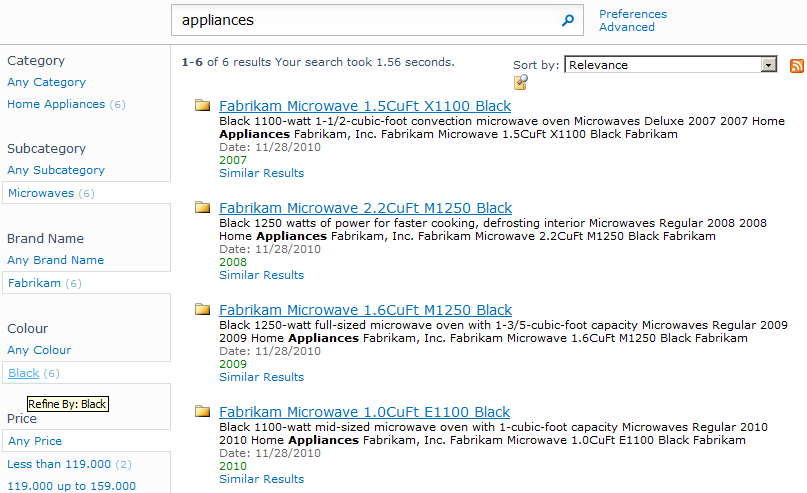
Now when searches are performed, refiners based on the Managed Properties and the Crawled Properties they've mapped to will display in search results.
Below are some test searches and screenshots of the custom Refiners in action!